SupportUsing Pylon
Using Pylon
This guide outlines our process for handling support requests at Langfuse. For this, we use Pylon (docs):
- Centralize our support channels in a single inbox
- Manage escalation levels and track SLAs
- Link customer requests and reported bugs to Linear issues
Everyone gets access to Pylon during onboarding.
What is the Process in Pylon?
- Unified inbox: Pylon is synced with our support channels: Slack Connect channels, MS Teams channels, email support addresses, GitHub Discussions (Support and Ideas), and in-app support form. Pylon uses AI to merge messages into support tickets in case a user uses multiple messages for a single request.
- 1st level support: Screens the inbox regularly, answers questions
- Assign 2nd level owner if escalation is needed
- Generally, escalate bug reports and feature requests to owner. Owner takes care of linking to their Linear backlog (see product ops).
- Owner (engineer, GTM): fixes/logs the issue, notes feedback, and gives technical advice.
- Close the loop: Resolve immediately or log an issue and ping the user once fixed + update docs
How to use Pylon?
Core application screen
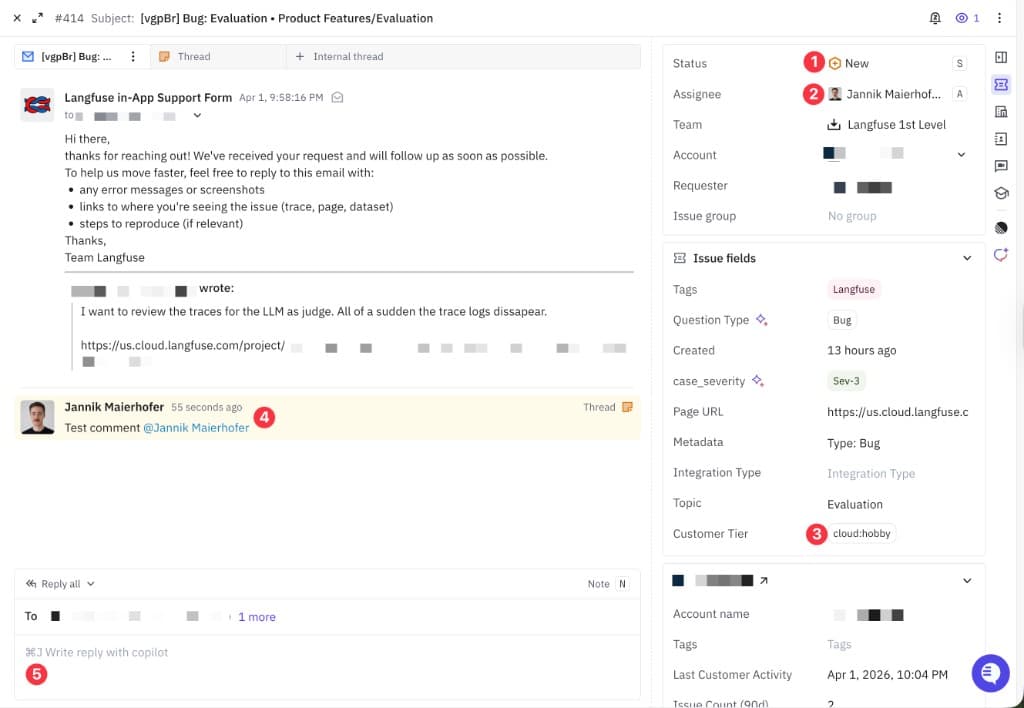
- Status of an Issue.
- Assignee of an Issue. You own the issue if you are assigned.
- Customer Tier: Check if they are paying us.
- Leave internal notes and tag people.
- Use Pylon to directly reply in Slack/MS Teams/email/chat widget.
Personal workflow
- If you are not on first-level support duty:
- You can focus on the view
My issues (only assigned). - It is expected that you clear these out at least once a day.
- You can focus on the view
Recommended Notification Settings
- Subscribe to all events related to threads assigned to you
- In general, we use Slack async. For most members of the team, we recommend enabling Pylon notifications in Slack as the default in order to move fast on customer communication.
- If you are on PTO, please turn on
Away Modein order to (1) unassign threads upon new responses from you and (2) disable any automation that auto-assigns tickets to you
Was this page helpful?
